Family vaccine tracker for iPhone and Android

Track your whole family's vaccines in one private app

Vaxnext is a family vaccine tracker app that keeps every family member's immunization record on your phone: the CDC and ACIP child and adolescent schedule, yearly flu shots, travel vaccines for 204 destinations, and a reminder when a dose is due.

Get it on Google Play
Download on the App Store
  • Free
  • Local-first
  • Health data never shared
  • No account needed
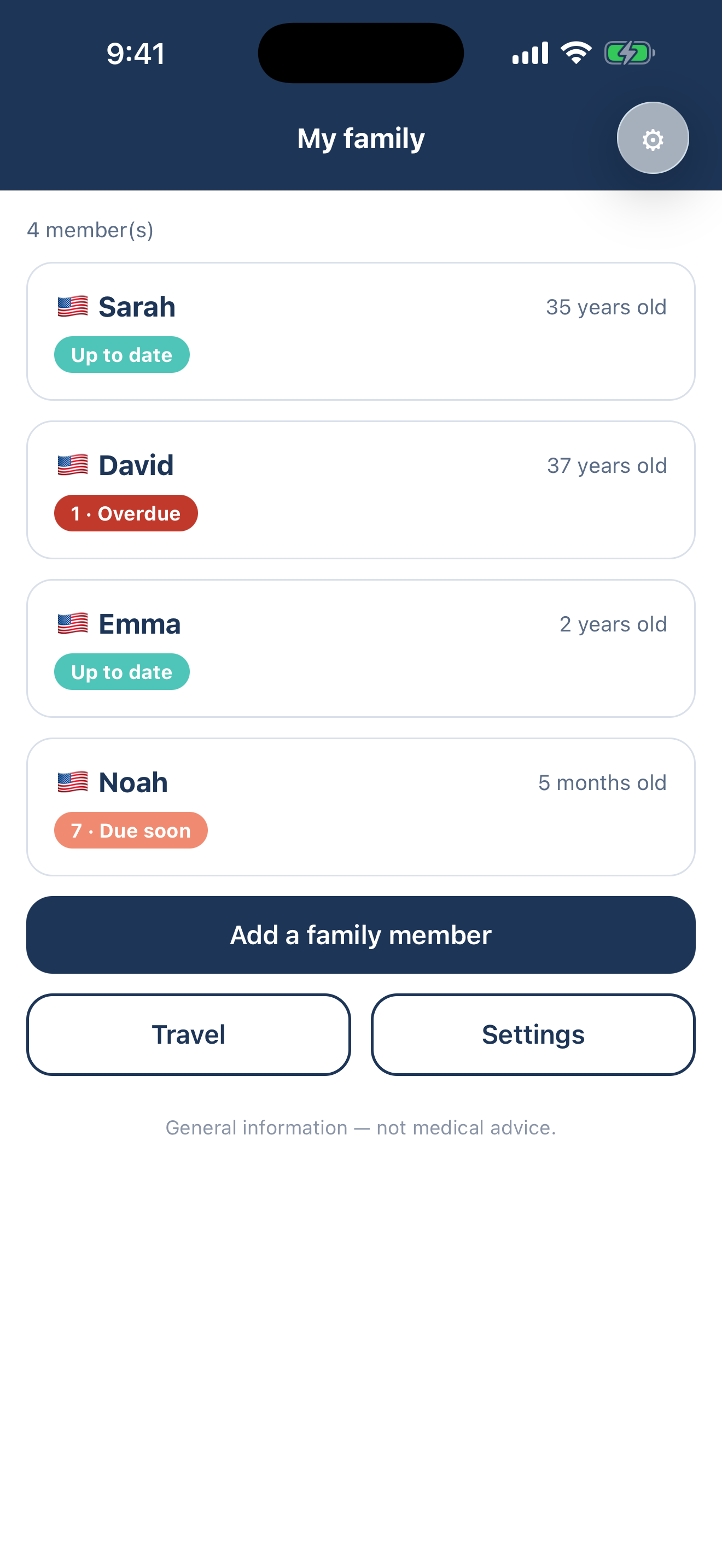
Vaxnext family vaccine tracker: the My family screen lists four family members with their vaccination status — up to date, overdue or due soon.

Built for U.S. families who travel

∞family members
204travel destinations
12vaccines on the CDC child & teen schedule
0health records leave your phone

Your whole family, up to date

Family record

Parents, kids, grandparents — one profile each, no limit.

U.S. schedule & travel

The CDC and ACIP child and teen schedule, flu shots, 204 travel destinations.

Local-first privacy

Health data stays on the phone. No account. JSON export.

Reminders

A notification when a dose is due or overdue, computed on the phone — offline.

What is a family vaccine tracker app?

A family vaccine tracker app holds one record of every shot each member of a household has had, checked against an official immunization schedule so you can see who is behind. Vaxnext is a family vaccine tracker app for iPhone and Android that keeps that record on the phone: one profile per person, no account, nothing uploaded.

A dose is four things: the vaccine, the date, its number in the series, and an optional note. Vaxnext compares them against the child and adolescent immunization schedule published by the CDC and its Advisory Committee on Immunization Practices (ACIP), then marks each vaccine Up to date, Due soon, Overdue or Not yet due. Too thin a record shows an em dash, never a guess.

What Vaxnext does

  • One profile per family member, no limit.
  • 12 vaccines and 33 doses from the CDC and ACIP child and adolescent schedule, plus yearly flu shots.
  • Travel vaccines for 204 destinations, from CDC Travelers’ Health.
  • Vaccines you add by name, and reminders that fire offline.
  • A JSON export through the phone's share sheet.

What Vaxnext does not do

  • No adult immunization schedule: the chart stops at adolescence.
  • No lot numbers, clinic names, photos or attachments.
  • No PDF export and no printable card.
  • No reminder lead time to set: the window is fixed at 60 days.
  • No subscription, no in-app purchase, no web version.

Vaxnext is not for an adult who wants a schedule of their own, and it is not a medical device. It shows general information from published schedules and does not replace a healthcare professional: ask a doctor or a pharmacist before any decision about a vaccine.

Which vaccine schedule does Vaxnext follow?

Vaxnext follows the Recommended Child and Adolescent Immunization Schedule for the United States, published by the CDC with its Advisory Committee on Immunization Practices (ACIP). The copy inside the app covers 12 vaccines and 33 scheduled doses and was retrieved from the CDC on July 21, 2026, a date the app prints on its Data sources screen.

Seasonal flu is the one entry that expires: Vaxnext counts a flu dose as covering 12 months, so a family member vaccinated last season returns to Due soon. The American Academy of Pediatrics (AAP) publishes its own child schedule; a U.S. pediatrician follows one of the two.

The CDC and ACIP schedule as shipped in Vaxnext
VaccineDoses in the Vaxnext schedule
Hepatitis B3
Rotavirus2
Diphtheria–Tetanus–Pertussis5
Haemophilus influenzae b4
Pneumococcus4
Polio4
Measles–Mumps–Rubella2
Chickenpox2
Hepatitis A2
Seasonal flu1, renewed every 12 months
Meningococcus ACWY2
HPV2

How does Vaxnext handle travel vaccines?

Pick a destination and the family member who is traveling, and Vaxnext lists the vaccines the CDC associates with that country, sorted into three levels. The travel data covers 204 destinations and 11 vaccines and was drawn from CDC Travelers' Health on July 28, 2026.

The three levels, and how many entries each holds across the 204 destinations
LevelWhat it meansEntries
RequiredProof can be demanded at the border.1
RecommendedThe CDC recommends it for most travelers to that destination.243
To considerWorth raising with a clinician, depending on the trip.797

A vaccine already on that person's profile shows as Covered; a missing one joins the profile in a tap. These sets are generated from CDC risk groupings by script rather than reviewed destination by destination by a clinician. The app's Data sources screen names CDC Travelers' Health as their source and tells you to confirm with a physician or a travel clinic before you leave.


Where does your family's vaccination record live?

On the phone, and nowhere else. Vaxnext has no account and no server of ours, so a child's immunization history never leaves the device unless you export it yourself.

  • Local-firstProfiles, vaccines and dates live on your device. Without an account, your records are never sent to us or shared with advertisers.
  • Ads never see your health dataVaxnext is free and shows non-personalized ads (Google AdMob). Advertisers never receive your vaccination records, and we never sell your data.
  • No server, no accountNothing to sign into and no health records in the cloud — nothing to breach. Export or wipe your data from the app at any time.

How do reminders work without an account?

Vaxnext schedules one local notification per vaccine that is overdue or coming due, on the phone itself. There is no push server and nothing to sign into, so reminders fire in airplane mode and are rebuilt whenever the record changes.

A vaccine turns Due soon 60 days before it is due, and Overdue once that date passes. The 60-day window is fixed: there is no lead time to configure.

Turning reminders on

  1. Open Vaxnext and tap the gear icon on the My family screen.
  2. Under Reminders, tap Turn on reminders.
  3. Allow notifications when your phone asks.
  4. Add your family and the doses you know; Vaxnext reschedules the rest.

Frequently asked questions

Does Vaxnext work without an account or an internet connection?

Yes. Vaxnext has no sign-in and no server of ours: profiles, doses and reminders are stored and computed on the phone, so the app works in airplane mode.

Does Vaxnext cover the adult immunization schedule?

No. The built-in schedule is the CDC and ACIP child and adolescent chart plus the yearly flu shot, so an adult profile shows an em dash where that chart cannot judge. You can still record an adult dose by name.

How many family members can I add to Vaxnext?

There is no limit. Profiles are stored on the device with no cap and no paid tier that unlocks more, so parents, children and grandparents all fit in the same free app.

Can I get my family record out of Vaxnext?

Yes, as a JSON file. Settings, then Data & privacy, then Privacy, then Export my data writes a dated file holding every profile and every dose, and hands it to the phone's share sheet. There is no PDF export.

Does Vaxnext show ads on a family member's vaccination record?

No. The banner appears on two screens only, the family list and the Travel screen, and a full-screen ad appears at most once every three minutes, and only when you open Travel or Settings.

Can Vaxnext tell me whether my child needs a shot?

No. Vaxnext compares the doses you enter against the schedule the CDC publishes; that is general information, not medical advice, and it does not replace a healthcare professional. Let a doctor or a pharmacist make the call.

What does Vaxnext cost?

Nothing. Vaxnext is free on Google Play and the App Store with every feature included — unlimited family members, the CDC and ACIP schedule, 204 travel destinations, reminders and export — and there is no subscription or in-app purchase.

Get it on Google Play
Download on the App Store

Free, supported by non-personalized ads.

Free on iPhone and Android — on the App Store and Google Play.

Non-personalized ads from Google AdMob pay for it, and Vaxnext is deliberate about where they go. A banner sits at the bottom of two screens only, the family list and the Travel screen, never on a vaccination record. A full-screen ad appears at most once every three minutes, and only when you open Travel or Settings. The ad SDK receives a device advertising identifier and basic device signals — which is why the store listings declare that data is collected — but never a vaccination record.